Policy Overview
What is Policy?
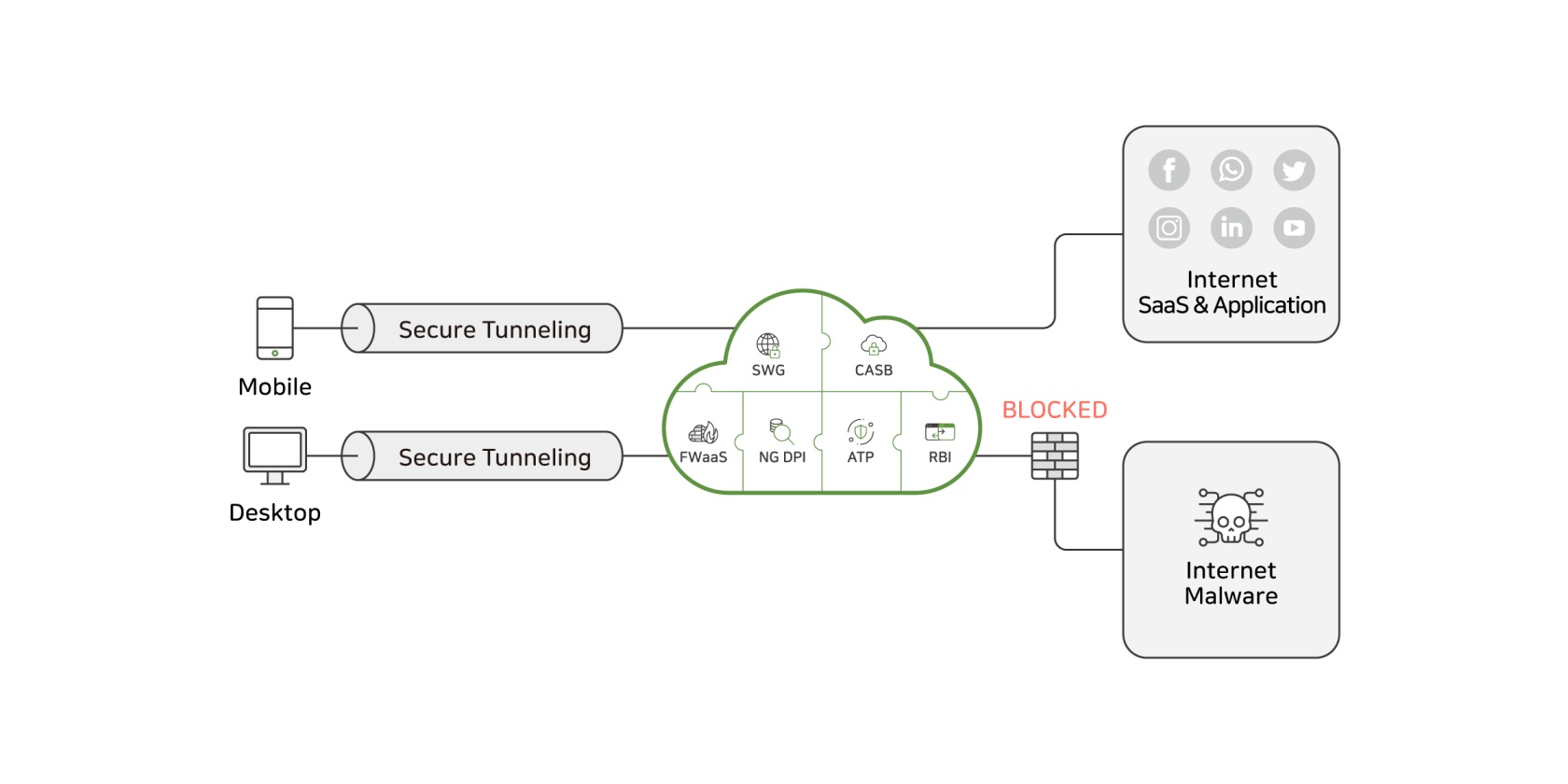
The Policy feature in the SSE platform allows administrators to define and enforce granular security rules for web traffic. It supports request-based controls, such as blocking command-and-control (C&C) traffic, filtering by source or destination IP and geolocation, restricting access to public proxies or risky websites, and inspecting HTTP attributes including URLs, headers, methods, and file uploads.
Policies can also analyze response traffic, using advanced threat protection and antivirus scanning to detect and block malicious code or unsafe file downloads. The system enables deep inspection of HTTP content, including query strings, payloads, and file extensions, to prevent unauthorized or harmful data exchange. Data Loss Prevention (DLP) safeguards sensitive information from leaving the organization.
Together, these capabilities provide comprehensive control and visibility over all web interactions within the SSE environment.
Settings for the Data Loss Prevention must be configured in it's respective menu first before being applied in the web policy menu.
Policy Menu
Below is a visual overview of the web policy menu:
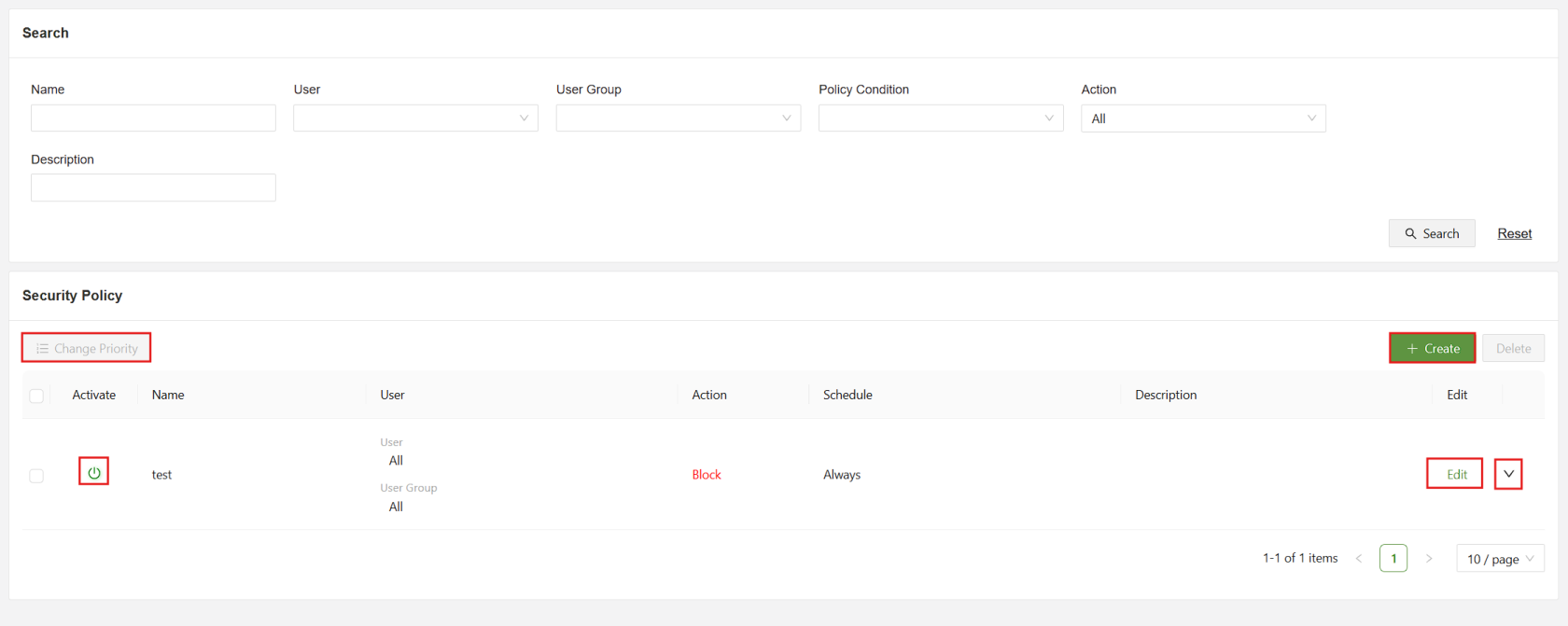
Below is a list of each part of the menu and a short description:
| Search | Filter the list of security policies using the specified fields |
| Change Priority | When selected, allows for the order change of policies, policies that appear earlier in the list have a higher priority and will override other rules. |
| Activate | Used to enable/disable policy rules |
| Create | Used to access the “Create Security Policy” form |
| Edit | Used to open the “Edit Security Policy” form for the specified rule |
| Dropdown | Click the dropdown for a more detailed view of the specified policy |
Security Policy Menu
Below is a visual overview of the security policy menu:
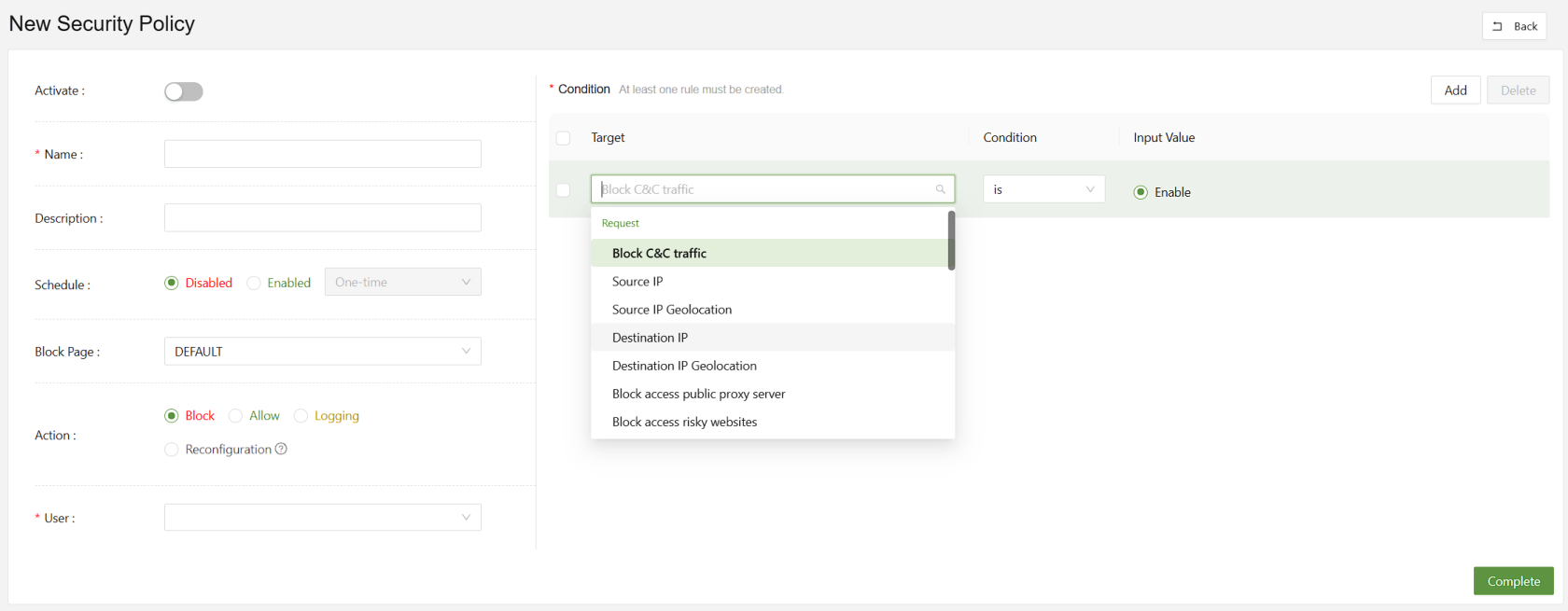
Below is a list of each part of the menu and a short description:
| Name(Unique) | A unique identifier for the new security policy |
| Description | A short description of the policy and its purpose |
| Schedule | Used to set a one time or reoccurring schedule based on the time and date of the selected time zone |
| Block Page | Set the specified block page message when the rule is used to block access |
| Action | Set the rule to Block, Allow, Log, or Reconfigure. |
| User | Set the users or user groups that are affected by this policy |
| Condition | Used to set the conditions to be tested by the rule, requires a Subject, Condition and Value |
When configuring a web policy, there are several condition options available, which will be listed below with a short description:
Request-Based Conditions
| Block C&C Traffic | Detects and blocks connections to known command-and-control (C&C) servers used by malware |
| Source IP | Applies policy rules based on the originating IP address of the request. |
| Source IP Geolocation | Filters or restricts requests based on the geographic location of the source IP |
| Destination IP | Enforces policies targeting specific destination IP addresses |
| Destination IP Geolocation | Controls access to destinations located in specified geographic regions |
| Block Access to Public Proxy Server | Prevents users from connecting to open or anonymous proxy servers |
| Block Access to Risky Websites | Restricts access to domains categorized as unsafe or potentially harmful |
| HTTP Category | Applies filtering based on predefined website categories (e.g., social media, gambling) |
| HTTP Browser | Enforces policy rules according to the web browser type or version used in the request |
| HTTP URL | Matches specific URLs to allow, block, or monitor web traffic |
| HTTP Path | Targets URL path components to control access to specific resources within a site |
| HTTP Method | Regulates HTTP request types (e.g., GET, POST, PUT, DELETE) for security or compliance |
| HTTP Version | Filters requests based on the HTTP protocol version used (e.g., 1.1, 2.0) |
| HTTP POST Payload | Analyzes data sent in POST requests to detect sensitive or malicious content |
| HTTP GET Query | Examines query parameters in GET requests for suspicious or policy-violating content |
| HTTP Upload File Content | Scans the actual contents of uploaded files for threats or sensitive data |
| HTTP Upload File Extension | Restricts or allows uploads based on file extension types |
| HTTP Content Length | Applies limits or rules based on the size of HTTP request or response bodies |
| HTTP GET Query Value Length | Restricts excessive query string lengths to prevent injection or buffer overflow attacks |
| HTTP POST Payload Value Length | Limits POST data field sizes to reduce risk of data exfiltration or abuse |
Response-Based Conditions
| Advanced Threat Protection | Detects and blocks advanced or zero-day threats in web responses |
| Anti-Virus | Scans and removes known malware signatures in downloaded or viewed content |
| HTTP Response Includes Malicious Code | Identifies and blocks responses that contain embedded malicious scripts or code |
| HTTP Download File Content | Analyzes downloaded files in real time for hidden malware or policy violations |
| HTTP Download File Extension | Controls which file types users are permitted to download based on extension |