Policy Configuration
This page will provide steps on how to successfully configure a SWG policy. As there are several aspects of the security policy configuration section that require configuration of other sections, those parts will have links to the relevant guide and will proceed as if it has been previously configured.
Configuration Guide
Step 1: Navigate to SWG > Policy > Create
In this menu, a new security policy can be created.
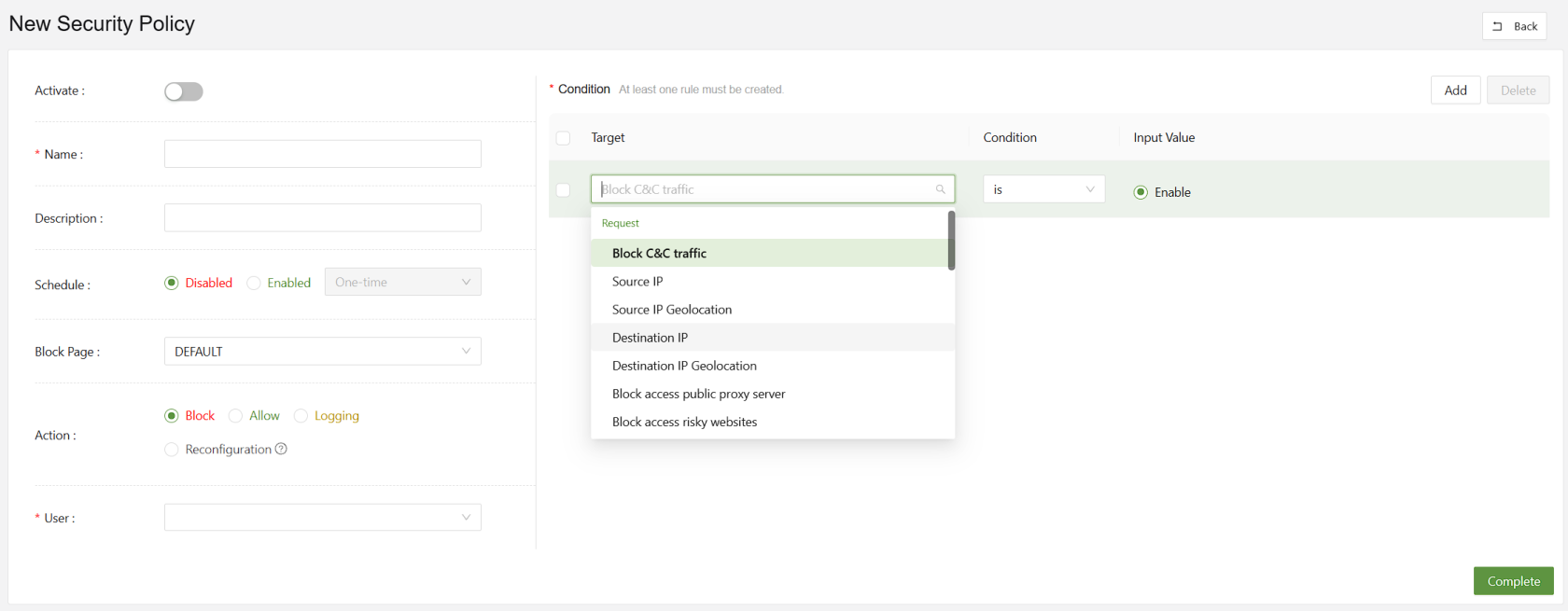
Step 2: Set the action
Web policies can be set to:
- Block
- Allow
- Logging
- Reconfiguration

Block will block the traffic triggered by the conditions set to the right. Allow will explicitly allow it. Logging will make a log. Reconfiguration allows the admin to make a rule reconfiguring HTTP URLs or headers.
Step 3: Choose the User
This section is for choosing the user or user groups who will be affected by the policies. Due to the large numbers of users organizations could have, it's important to set up user groups for easy policy creation.

In this example there are only two users. However, one or all must be chosen to apply a policy.
Step 4: Set the Conditions
The most crucial part of setting a policy is selecting the conditions. These conditions are what the security policy will check against before taking action.
In this menu, all are AND rules.
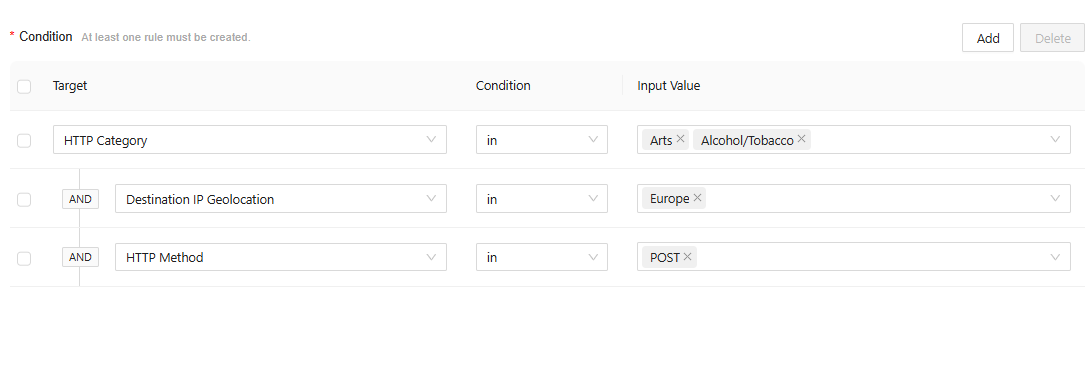
In the above example, all PUT requests going to an art, alcohol, or tobacco website based in Europe will be blocked.
For convenience, below are a full read out of the conditions:
Request-Based Conditions
| Block C&C Traffic | Detects and blocks connections to known command-and-control (C&C) servers used by malware |
| Source IP | Applies policy rules based on the originating IP address of the request. |
| Source IP Geolocation | Filters or restricts requests based on the geographic location of the source IP |
| Destination IP | Enforces policies targeting specific destination IP addresses |
| Destination IP Geolocation | Controls access to destinations located in specified geographic regions |
| Block Access to Public Proxy Server | Prevents users from connecting to open or anonymous proxy servers |
| Block Access to Risky Websites | Restricts access to domains categorized as unsafe or potentially harmful |
| HTTP Category | Applies filtering based on predefined website categories (e.g., social media, gambling) |
| HTTP Browser | Enforces policy rules according to the web browser type or version used in the request |
| HTTP URL | Matches specific URLs to allow, block, or monitor web traffic |
| HTTP Path | Targets URL path components to control access to specific resources within a site |
| HTTP Method | Regulates HTTP request types (e.g., GET, POST, PUT, DELETE) for security or compliance |
| HTTP Version | Filters requests based on the HTTP protocol version used (e.g., 1.1, 2.0) |
| HTTP POST Payload | Analyzes data sent in POST requests to detect sensitive or malicious content |
| HTTP GET Query | Examines query parameters in GET requests for suspicious or policy-violating content |
| HTTP Upload File Content | Scans the actual contents of uploaded files for threats or sensitive data |
| HTTP Upload File Extension | Restricts or allows uploads based on file extension types |
| HTTP Content Length | Applies limits or rules based on the size of HTTP request or response bodies |
| HTTP GET Query Value Length | Restricts excessive query string lengths to prevent injection or buffer overflow attacks |
| HTTP POST Payload Value Length | Limits POST data field sizes to reduce risk of data exfiltration or abuse |
Response-Based Conditions
| Advanced Threat Protection | Detects and blocks advanced or zero-day threats in web responses |
| Anti-Virus | Scans and removes known malware signatures in downloaded or viewed content |
| HTTP Response Includes Malicious Code | Identifies and blocks responses that contain embedded malicious scripts or code |
| HTTP Download File Content | Analyzes downloaded files in real time for hidden malware or policy violations |
| HTTP Download File Extension | Controls which file types users are permitted to download based on extension |